E-commerce Website & App with Razorpay + WhatsApp AI Cart Recovery (2026 Guide)
Fully automated e-commerce · Razorpay payments · delivery tracking · Meta WhatsApp AI cart recovery · website + Flutter app · Varanasi & India.

Aaj har business sirf ek website nahi, ek fully automated e-commerce system chahta hai — website, mobile app, online payments, delivery, aur sabse important: customers ko bina manual follow-up ke wapas laana.
Yeh guide batata hai ki Web Developer Kashi kaise ek complete e-commerce setup banata hai jisme Razorpay payments, delivery integration, aur Meta WhatsApp API se chalne wala AI automation ek saath kaam karte hain. Sabse khaas part is system ka woh AI-driven WhatsApp automation hai jo abandoned cart customers ko automatically wapas laata hai — bina kisi insaan ke involvement ke.
Related guides: Razorpay integration guide · Flutter eCommerce app guide · E-commerce website guide · Threpsi Healthcare case study · Web design services · Mobile app services
Yeh Pura Automated E-commerce System Kya Hai?
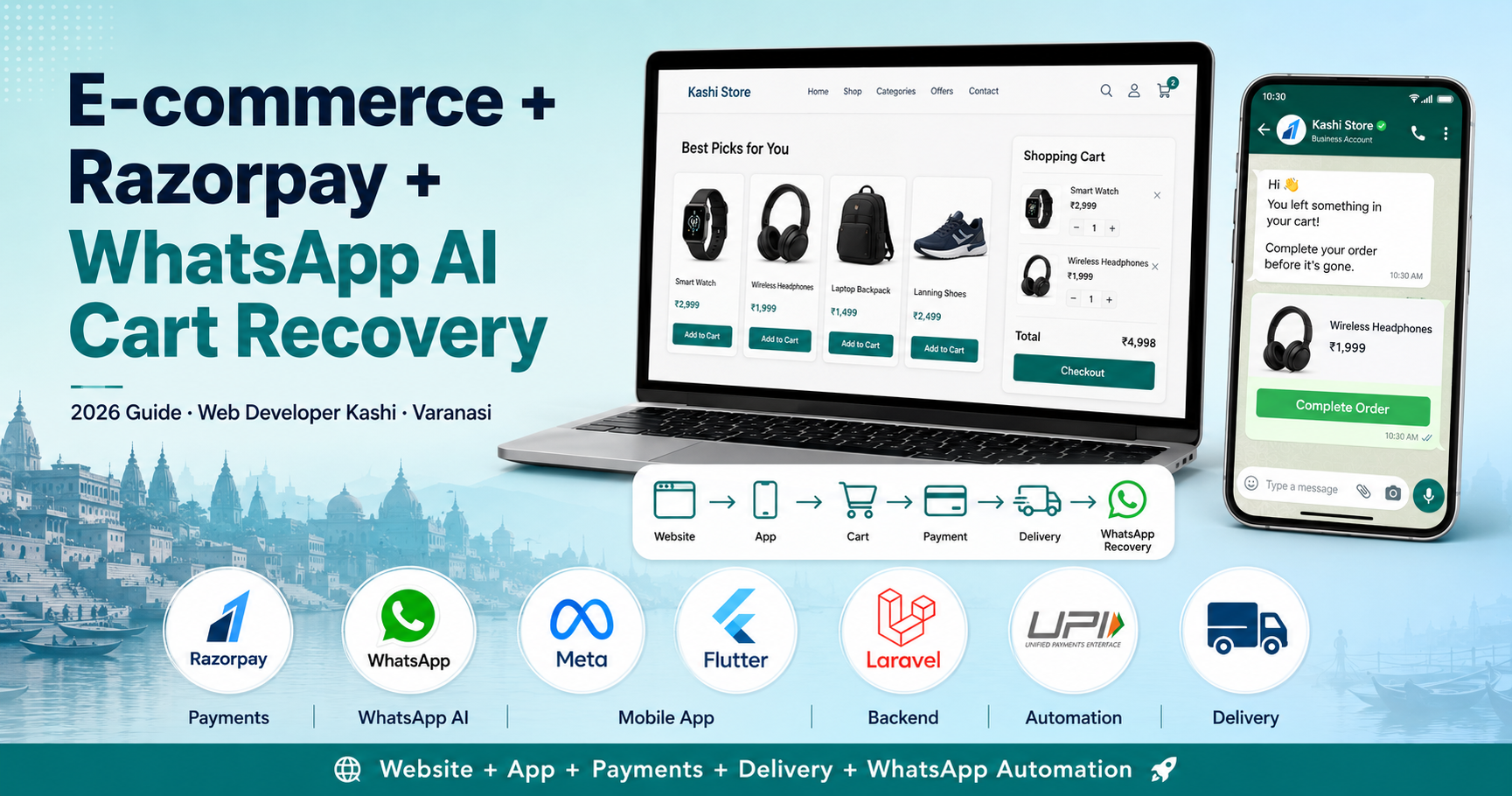
Yeh sirf ek online store nahi hai — yeh ek end-to-end revenue engine hai:
- Responsive e-commerce website — mobile-first, SEO-ready, fast checkout
- Native/Flutter mobile app — same backend, same catalogue, Android + iOS
- Razorpay se secure online payments — UPI, cards, net banking, wallets
- Delivery integration with real-time order tracking
- Meta WhatsApp Business API se automated AI follow-up — cart recovery, order updates, aur more
Step 1 — Website Aur Mobile App, Dono Same Backend Par
Customer chahe website use kare ya app, dono OTP-based login se connect hote hain. Yeh login sirf security ke liye nahi hai — yeh aapke automation ka foundation hai, kyunki OTP verify karte waqt customer ka WhatsApp number bhi verified ho jaata hai, jo aage automation mein use hota hai.
Ek hi Laravel (ya Node.js) backend par products, inventory, orders, customers aur cart data sync rehta hai. Website par add kiya product app mein dikhe, app par abandoned cart website par track ho — sab ek system.
Step 2 — Razorpay Payment Integration
Razorpay integrate karne se aapko milta hai:
- UPI, debit/credit cards, net banking aur wallets — sab ek hi checkout mein
- Webhooks se automatic order status update (paid / failed / refunded)
- Secure, PCI-DSS compliant transactions
- Automated settlement aur payment reports admin panel mein
Live example: humne Threpsi Healthcare aur Rajdari Dewdari Water Park par Razorpay end-to-end integrate kiya hai — signature verification, webhooks, aur admin reports ke saath.
Step 3 — Delivery Integration
Order confirm hone ke baad delivery part bhi automate hota hai:
- Order automatically delivery partner / dashboard ko assign hota hai (Delhivery, Shiprocket, ya custom logistics)
- Customer ko real-time tracking link milta hai
- Delivery status (out for delivery, delivered) customer ko automatically update hota hai — website, app, aur WhatsApp par
Step 4 — AI + WhatsApp Automation: Cart Chhoda? Hum Yaad Dilayenge
Yeh system ka sabse smart part hai. Poora flow is tarah kaam karta hai:
- Customer login karta hai OTP ke through — phone number verified ho jaata hai.
- Customer product cart mein add karta hai par checkout complete nahi karta.
- System background mein 1 hour ka timer track karta hai (yeh time aapke business ke hisaab se configurable hai).
- Agar 1 hour mein purchase nahi hota, Meta ka official WhatsApp Business API automatically ek approved message bhejta hai — jisme wahi product, uska image, aur ek direct “complete your order” link hota hai.
- Customer WhatsApp se hi click karke order complete kar sakta hai — bina dobara website/app khole.
Yeh poori prakriya 100% automated hai — koi aapki team ko manually follow-up nahi karna padta. Backend queue jobs / scheduler delayed triggers handle karte hain.
WhatsApp Cart Recovery Automation Kaam Kyun Karta Hai
- WhatsApp ke open rates email se bahut zyada hote hain
- Yeh customer ka already-trusted personal channel hai
- Lost sales bina extra ad-spend ke recover ho jaati hain
- Personalized message — sahi product, sahi customer, sahi time
Aur Kya-Kya WhatsApp AI Se Automate Ho Sakta Hai
- Order confirmation aur payment receipt
- Shipping / delivery status updates
- COD order reminder calls / messages
- Delivery ke baad review request
- Inactive customers ke liye re-engagement messages
- Basic FAQ ke liye WhatsApp AI chatbot replies
Tech Stack Behind This System
| Layer | Technology |
|---|---|
| Backend | Laravel / Node.js |
| Database | MySQL |
| Payments | Razorpay (UPI, cards, wallets, net banking) |
| Messaging | Meta WhatsApp Business (Cloud) API — official, template-approved |
| Automation engine | Queue jobs / scheduler for delayed (1-hour) triggers |
| Mobile app | Flutter (Android + iOS, single codebase) |
| Admin panel | Orders, cart, customers, delivery aur WhatsApp message logs ek hi dashboard mein |
Development Process: What to Expect
- Requirement & planning: aapka business model, products, delivery area samajhna
- Design: website + app UI/UX approval
- Development: Razorpay aur delivery logic ke saath core build
- WhatsApp Business API setup: Meta verification + message template approval
- Automation logic: cart-abandonment rules, queue jobs, multi-step reminders
- Testing: payment, delivery aur WhatsApp triggers end-to-end test
- Launch & training: aapki team ko admin panel ka training
Cost Factors
- Website + app, dono platforms (Android/iOS) ki complexity
- Delivery integration ka type (own delivery dashboard ya 3rd-party logistics)
- WhatsApp template messages ka monthly volume (Meta ki per-message pricing)
- Custom features jaise multi-step reminders, loyalty offers, etc.
Hum requirement samajhne ke baad clear, transparent quote dete hain — koi hidden cost nahi. Typically 6–14 weeks timeline hoti hai scope par depend karke.
Why Choose Web Developer Kashi
- Website + app + payment + delivery + WhatsApp automation — sab ek hi team se
- Meta WhatsApp Business API setup aur approval ka experience
- Razorpay integration aur secure checkout flow
- Easy-to-use admin panel — aap khud orders aur automation manage kar sakte hain
- Transparent pricing aur post-launch support — Sigra, Varanasi se India-wide clients

FAQs — E-commerce + WhatsApp AI Automation
Quick answers to common questions. Still need help? We’re just a message away.

WhatsApp, email or a call — pick what is easy.
Conclusion
Ek e-commerce website banana ab kaafi nahi hai — real growth tab hoti hai jab payments, delivery, aur customer follow-up sab automatically chalte hain. Razorpay, delivery integration aur Meta WhatsApp AI automation ke saath, aapka store khud apne lost customers ko wapas la sakta hai, bina aapki team ke extra effort ke.
To discuss your automated e-commerce system, message us on WhatsApp: +91-9696726607 — or visit webdeveloperkashi.com/contact and explore our software development services.
“Sabse achha automation woh hai jo customer ko sahi waqt par sahi message bheje — bina kisi ko yaad bhi rakhna pade.”
Free consultation lein — Web Developer Kashi, Sigra Varanasi se India-wide clients ke saath kaam karta hai.